Just discovered Kōji. Wow. I love this stuff.


Click an image for the slideshow. Then X top right to get back here.

Walter Logeman: Journal
Just discovered Kōji. Wow. I love this stuff.
Click an image for the slideshow. Then X top right to get back here.
I’m learning to use Jetpack for this blog. I’m also working on my art journal This is one of the Gallery sets that was in is my art blog but is not there now! Jetpack is doing a nice job!
I used to a lot of these, but no more? I still like them. I’d even forgotten there was a name for the genre.





I’ve joined a creativity group with Jan Allsopp who I’ve known online for a long time. My commitment is for a month (at least). Committed to 15 min a day for the month of January – I’m working on a book. I’ll post more about the book as time goes on. Today is day six and I’ve produced a lot each day. I find it helpful to have such a strong focus. A simple idea, choose a route – i.e. the tools. Mine are the Google files (Doc and Slides) I’m using to write the book. In addition we create ‘cruise control’ – a voluntary frame in which to work. Some voluntary restrictions I’m using are:
Also good to see other peoples art – so far so good. It will get harder as the month intensifies.
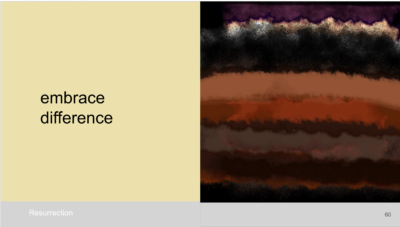
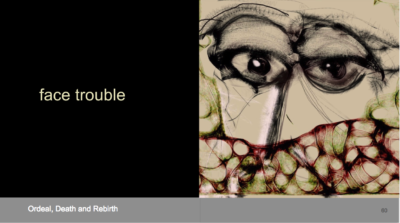
This is what the spreads in the book look like:
“Masters Of War”
Come you masters of war
You that build all the guns
You that build the death planes
You that build all the bombs
You that hide behind walls
You that hide behind desks
I just want you to know
I can see through your masks.
ITM – About this art book project

What do you think? I like it but I can change my mind at any time.
Posted earlier in this blog. Also the titles here may change.
One for the ITM project.
ITM – About this art book project

An early one #23 in the ThousandSketches. I like it.
I have a new creative project. A book. I will select about a hundred of my images that evoke a variety of mood and intensity, ranging from calm, surprise to fear. I’m working on the words. This project will link my art work with my psychological work. I’m looking for quality. Curation. The main thrust of the work is abstract, though some open-ended figurative images might pass the test.
Posts wi candidate images for the project will be in the Category ITM . I’ll be creating new images, searching for old ones, updating old ones and improving print quality if I can.
Which of my images do you think belong here? Have a look at ThousandSketches and earlier sketches on this blog. Post a link in the comments on this post And we can discuss.
Please comment on posts. What is the mood, intensity and moment or life stage the image evokes.
I’ll continue to post new sketches here that are not in the ITM Category (yet), so I will feel free to explore.
Thanks for being on the journey so far.

The Christchurch Art Gallery opened today. I loved being there. See my blog post with more images here.

Close up of a McCahon.
I would love it – for one thing: Drawing. iPads have never really done that well. But maybe this one, with its Pencil, beats the Wacom tablets.
BUT
Its not a computer. It drives me crazy on the iPad to add items to a calendar – to edit anything, it is such a pain to try to get the curser to go to the right place! I can’t see it replacing a Mac where the input options include a trackpad and a mouse. Touch screens that flop around laptop-style are so wrong – as Steve Jobs said “ergonomically terrible”!
But a Mac is no good for drawing.
I had a Toshiba M200 that was ok, it converted quite well – back in 2002! (Images) It went from vertical to horizontal.
Steve Jobs would not have succumbed to the vertical iPad. There has to be a better solution. An OSX device that incorporates touch, something like the new Surface Book (Images) is one possibility. I can’t bear the thought of going back to Windows & Microsoft, Surface Book reviews mention the crashes, the lack of attention to detail in the hardware design. Will convergence that allows conversion in hardware and software functions come to Apple?
In the meantime – and for a long time I imagine – in the Apple world we are stuck with the need for two devices, a Macbook and an iPad Pro. Probably three devices, I’d still want my iPad Mini for curling up with, the iPad Pro seems too big for that.
I hate seeing the iPad Pro used like a laptop, copying the ergonomically terrible Microsoft devices. As a horizontal drawing tool they look great.
Best advice for Apple: Create a touch/non-touch convertable OSX beta for the iPad pro. Maybe they are working on this?
Its more than a year since I posted some of my art. There are reasons! But here are a few more – continuing more or less where I left off.


